

Qwen3.8-3.6-27B Blend
Collection
Junie Local's unofficial JetBrains 50/50 blend of Qwen3.6-27B and Qwen3.8-27B: BF16, GGUF, and MLX weights. • 5 items • Updated • 7
Unofficial JetBrains derivative. This model was prepared by JetBrains using Qwen models developed by Alibaba Cloud. This release is not affiliated with, sponsored by, or endorsed by Alibaba Cloud or Alibaba Group.
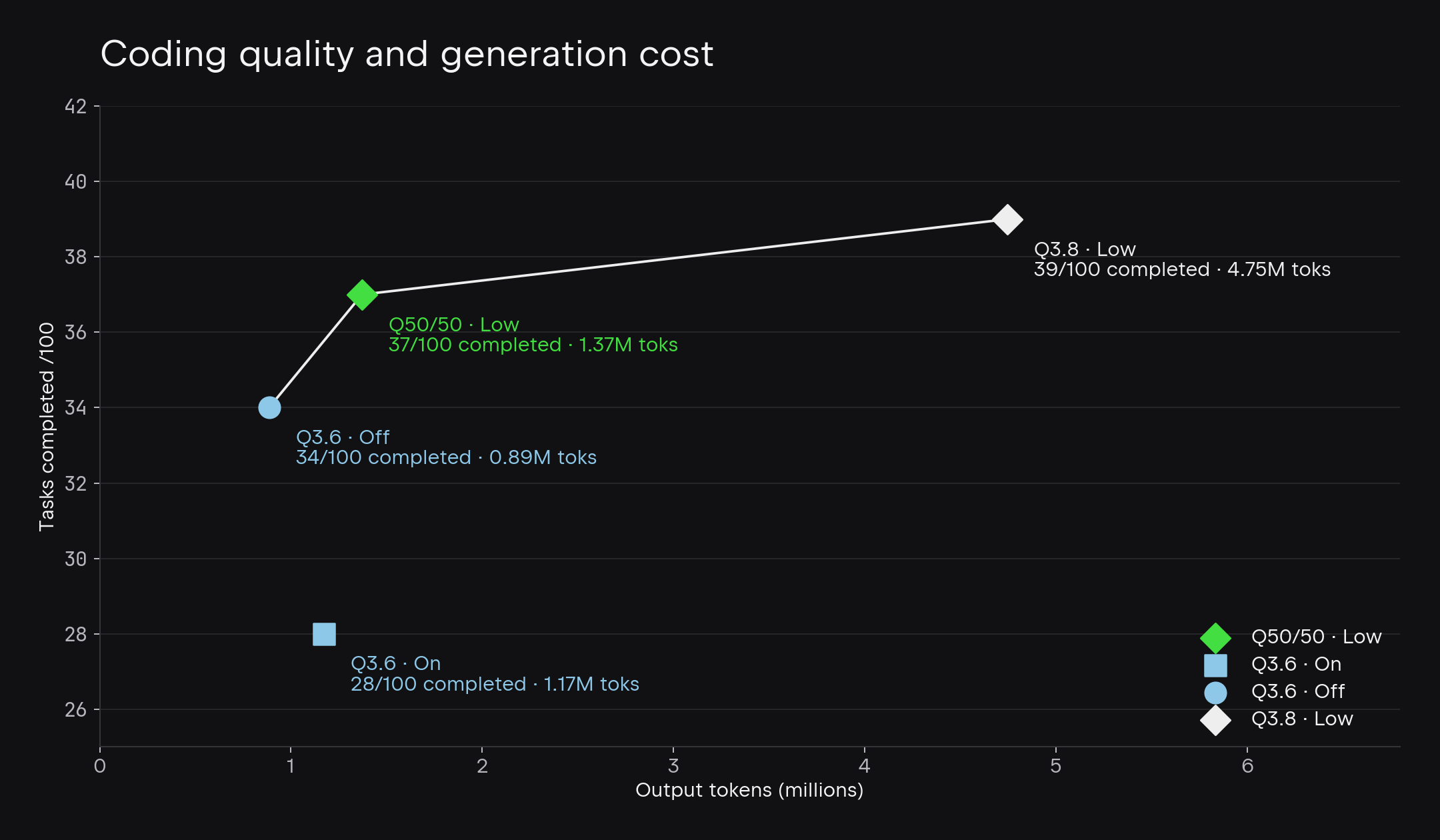
Tasks completed versus output tokens on JetBrains’ 100-task internal coding benchmark. Reasoning settings differ between configurations; see the article for methodology and context.
Read Making Local AI Smarter and Faster for the Junie Local release story, coding evaluations, token-efficiency results, and MTP runtime experiments.
Available formats: BF16 · GGUF · MLX 4-bit · MTP MLX 4-bit.
IQ3_S, IQ4_XS, Q4_K_M, and Q5_K_M conversions of JetBrains/Qwen3.8-3.6-27B-blend, pinned to revision f1a19acf58aa8caf7a0a507c9083245f79944dcc.
The base model is a 50/50 combination of Qwen3.6-27B and Qwen3.8-27B, created by linearly interpolating their checkpoint parameters. The configuration, tokenizer, processor, and chat template are retained from Qwen3.8-27B. Exact source revisions and merge settings are recorded in merge-manifest.json. See conversion-manifest.json for conversion settings and runtime versions.
| File | Size (decimal GB) | Contents |
|---|---|---|
Qwen3.8-3.6-27B-blend-IQ3_S.gguf |
12.60 | Main model plus native MTP head |
Qwen3.8-3.6-27B-blend-IQ4_XS.gguf |
14.25 | Calibrated mixed-precision main model plus native MTP head |
Qwen3.8-3.6-27B-blend-Q4_K_M.gguf |
16.81 | Main model plus native MTP head |
Qwen3.8-3.6-27B-blend-Q5_K_M.gguf |
19.54 | Main model plus native MTP head |
mmproj-Qwen3.8-3.6-27B-blend-BF16.gguf |
0.93 | BF16 vision encoder and projector |
mmproj-Qwen3.8-3.6-27B-blend-Q8_0.gguf |
0.63 | Q8_0 vision encoder and projector with F16 fallbacks |
The MTP head is embedded in each main GGUF. A separate drafter file is not required. Either vision GGUF can be used with any of the four main-model quantizations; choose one with --mmproj for image input.
Use a recent llama.cpp with Qwen3.5 native MTP support. The tested revision is 64e9bceb2c3a856efed96feda784a50947049feb.
llama-server \
  --model Qwen3.8-3.6-27B-blend-Q4_K_M.gguf \
  --mmproj mmproj-Qwen3.8-3.6-27B-blend-BF16.gguf \
  --alias Qwen3.8-3.6-27B-blend \
  --spec-type draft-mtp --spec-draft-n-max 3 \
  --n-gpu-layers 99 --ctx-size 8192 --parallel 2 \
  --jinja --reasoning on --reasoning-format deepseek \
  --chat-template-kwargs '{"enable_thinking":true,"preserve_thinking":true}' \
  --temp 1.0 --top-p 0.95 --top-k 20 --min-p 0 --repeat-penalty 1 \
  --host 127.0.0.1 --port 8080
Substitute the IQ3_S, IQ4_XS, or Q5_K_M filename to use that quant. For the smaller vision projector, replace the --mmproj filename with mmproj-Qwen3.8-3.6-27B-blend-Q8_0.gguf. API requests should retain the source sampling settings: temperature 1.0, top-p 0.95, top-k 20, with thinking enabled.
The original IQ3_S, Q4_K_M, and Q5_K_M quants were produced directly from one BF16 GGUF intermediate, using llama.cpp's default quantization recipes, without an importance matrix. They were not converted from previously quantized MLX weights.
python convert_hf_to_gguf.py /path/to/pinned-bf16-source \
  --outtype bf16 --outfile model-BF16.gguf
./build/bin/llama-quantize model-BF16.gguf model-IQ3_S.gguf IQ3_S 10
./build/bin/llama-quantize model-BF16.gguf model-Q4_K_M.gguf Q4_K_M 10
./build/bin/llama-quantize model-BF16.gguf model-Q5_K_M.gguf Q5_K_M 10
python convert_hf_to_gguf.py /path/to/pinned-bf16-source \
  --mmproj --outtype bf16 --outfile mmproj-BF16.gguf
Environment: Python 3.12.14, PyTorch 2.11.0, Transformers 5.14.0, NumPy 1.26.4; llama.cpp built with Metal on an Apple M5 Max with 128 GiB RAM. Full conversion and validation settings are in conversion-manifest.json.
All four quants retain all 866 main-file tensors, including all 15 MTP tensors, with one next-token-prediction layer declared in the GGUF metadata.
The original IQ3_S, Q4_K_M, and Q5_K_M passed local text, image, streaming, two-request concurrency, invalid-request handling, client-disconnect cleanup, and post-cancellation recovery checks on Metal. The image test correctly identified a red square and blue circle. Text responses included separate reasoning content with thinking enabled.
On the first arithmetic smoke request, Q4_K_M accepted 98/114 drafted tokens (86.0%) and Q5_K_M accepted 78/93 (83.9%). These are individual smoke results, not comparative quality or speed benchmarks. No BF16 parity or broad quality evaluation is claimed.
IQ3_S was added on 2026-09-15 using the same BF16 intermediate and llama.cpp revision. It passed the same functional checks with thinking and native MTP enabled. Its arithmetic smoke request accepted 113/144 drafted tokens (78.5%). This is a smoke-test observation, not a quality or performance benchmark. The exact artifact SHA256, input SHA256, and validation results are recorded in conversion-manifest.json.
Qwen3.8-3.6-27B-blend-IQ4_XS.gguf is a 14.25 GB mixed-precision quantization, approximately 15.2% smaller than the published Q4_K_M. Its tensor-type assignments follow Unsloth's Qwen3.8 UD-IQ4_XS artifact, applied to the blend's BF16 weights with a new importance matrix computed on 262,144 calibration tokens (32 windows of 8,192 tokens). This is a JetBrains quantization using the published tensor assignments, not an official Unsloth release or a reproduction of its recipe-selection process. The filename denotes the recipe; individual tensors use several quantization formats.
All 866 tensor shapes and types were verified. Text-only BF16-relative KL validation was performed with MTP disabled. The functional image, MTP, streaming, and concurrency checks reported above for the original quants have not been repeated for this IQ4_XS artifact. No additional fine-tuning was performed.
The upload copy replaces local calibration path labels in GGUF metadata with portable names; its tensor payload is byte-identical to the evaluated candidate. See quantization-IQ4_XS.json for checksums and calibration settings, and IQ4_XS.tensor-types.txt for the exact tensor assignments.
mmproj-Qwen3.8-3.6-27B-blend-Q8_0.gguf is 629,247,584 bytes (0.63 GB), 32.4% smaller than the 931,146,464-byte BF16 projector. It was quantized directly from the existing BF16 projector with the same pinned llama.cpp revision:
llama-quantize mmproj-Qwen3.8-3.6-27B-blend-BF16.gguf \
  mmproj-Qwen3.8-3.6-27B-blend-Q8_0.gguf Q8_0 10
All 334 tensor names and shapes are preserved: 83 tensors use Q8_0, 27 feed-forward down-projection matrices use F16, and 224 F32 tensors remain byte-identical. The F16 fallback is llama.cpp's default because these matrices have width 4,304, which is not divisible by Q8_0's block size of 32. No calibration dataset or importance matrix was used.
Both BF16 and Q8_0 projectors passed the same synthetic image smoke with the published Q4_K_M main model on Metal, with thinking and native MTP enabled: each correctly identified a red square followed by a blue circle. This is a functional smoke test, not a broad vision-quality comparison. See quantization-mmproj-Q8_0.json for checksums, tensor assignments, and validation settings. The original BF16 projector remains available.
Distributed under the Apache License, Version 2.0. The original Qwen LICENSE, including Copyright 2026 Alibaba Cloud, is retained unchanged.
Copyright © 2026 JetBrains s.r.o. This notice applies only to original material contributed by JetBrains. Upstream Qwen material remains subject to its original copyright and attribution notices.
See NOTICE for attribution and CHANGES.md for a description of the modifications and the affected files.
This model is distributed under the Apache License, Version 2.0. This notice does not modify the License. Users are reminded that using this model, or its outputs, to infringe the copyright or other intellectual property rights of third parties may violate applicable law, independent of the terms of this License.
No additional training or fine-tuning was performed; IQ4_XS uses calibration data only for post-training quantization, and its preparation consisted of the checkpoint merge and, where applicable, the extraction, format conversion, and quantization described above and in CHANGES.md.
For upstream information, see the official Qwen3.6-27B model card and Qwen3.8-27B model card. Qwen also publishes a Training Data Summary, which describes training data for models powering qwen.ai generally; it does not identify the exact training datasets for these two checkpoints.
3-bit
4-bit
5-bit
Base model
JetBrains/Qwen3.8-3.6-27B-blend